Panasonic Audio Connect2.9.2
Publisher Description

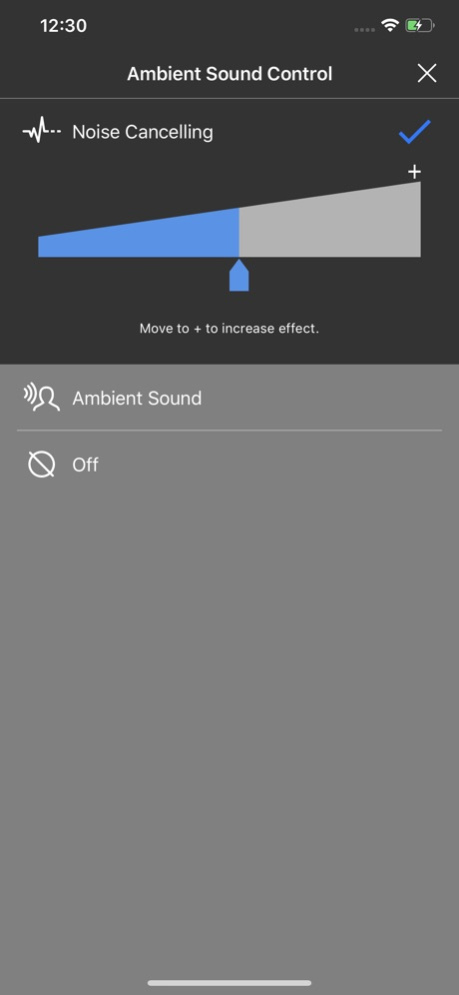

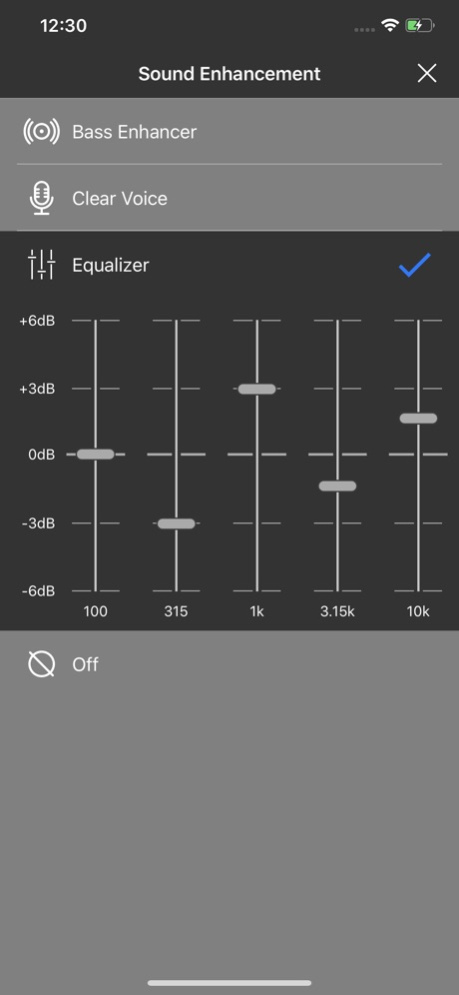
This is an official Panasonic app.
This app makes it even easier to connect and configure your headphones.
By linking with a set of Panasonic headphones that are compatible with the app, your music listening experience becomes even more appealing.
・ Compatible models
- Panasonic RP-HD610N
- Panasonic RZ-S30W/RZ-S300W
- Panasonic RZ-S50W/RZ-S500W
Panasonic Audio Connect enables you to enjoy the following kinds of functions.
・ Guiding connections with smartphones and tablets
・ Customizing various settings
・ Accessing the Online manual
・ Updating firmware
Version History ・The contents of the End Users License Agreement have been revised.
・Improved general performance 2.9.2 Apr 27 ・Improved general performance 2.8.9 05/13/2024 ・Minor change 2.8.6 10/27/2022 ・Minor change 2.8.5 08/02/2022 ・The contents of the End Users License Agreement have been revised.
・Improved general performance. 2.8.4 06/21/2022 ・The contents of the Privacy Policy have been revised.
・Improved general performance. 2.8.3 02/03/2022 ・The contents of the Privacy Policy have been revised.
・Improves general performance. 2.8.2 12/21/2021 - Improves general performance 2.8.1 10/28/2021 - Improves general performance 2.8.0 06/29/2021 - Improved to make it easier to understand the FW update of the earbuds 2.7.2 05/10/2021 - Added Privacy Policy
- Improves general performance 2.7.1 03/29/2021 - Added key customization option.
- Added explanation how to wakeup from "auto power off".
- Improves general performance. 2.7.0 02/24/2021 - Added customization option with a long press on a right ear bud to select Noise Cancelling, Ambient mode, and off.
- Added customization option to disable touch sensor.
- Added Italian, Polish, and Russian.
- Fixed several minor bugs. 2.6.0 12/07/2020 - UI improvement of earbuds firmware update progress
- Some minor issues resolved 2.5.0 10/05/2020 - Functions added
- Some minor issues resolved 2.4.0 08/03/2020 - Some minor issues resolved 2.3.0 06/22/2020 - Some minor issues resolved
- Supported languages added 2.2.0 05/07/2020 - Some minor issues resolved 2.1.0 04/09/2020 - Some minor issues resolved 2.0.2 03/14/2020 - Improved screen display
- Supported models added 2.0.1 03/13/2020 - Improvement of screen display
- Improved connectivity
- Improvements to stability of other operations 1.2.0 09/18/2019 - 5 languages supported (Japanese, English, German, French, Canadian French)
- Improved connectivity
- Improvements to stability of other operations 1.1.0 05/31/2019 1.0.0 02/21/2019
About Panasonic Audio Connect
The company that develops Panasonic Audio Connect is PANASONIC ENTERTAINMENT & COMMUNICATION CO., LTD.. The latest version released by its developer is 2.9.2.
To install Panasonic Audio Connect on your iOS device, just click the green Continue To App button above to start the installation process. The app is listed on our website since 2026-10-14 and was downloaded 24 times. We have already checked if the download link is safe, however for your own protection we recommend that you scan the downloaded app with your antivirus. Your antivirus may detect the Panasonic Audio Connect as malware if the download link is broken.
How to install Panasonic Audio Connect on your iOS device:
- Click on the Continue To App button on our website. This will redirect you to the App Store.
- Once the Panasonic Audio Connect is shown in the iTunes listing of your iOS device, you can start its download and installation. Tap on the GET button to the right of the app to start downloading it.
- If you are not logged-in the iOS appstore app, you'll be prompted for your your Apple ID and/or password.
- After Panasonic Audio Connect is downloaded, you'll see an INSTALL button to the right. Tap on it to start the actual installation of the iOS app.
- Once installation is finished you can tap on the OPEN button to start it. Its icon will also be added to your device home screen.
Program Details
General
System requirements
Download information
Pricing
Version History
version 2.9.2
posted on 2026-10-14
Version History ・The contents of the End Users License Agreement have been revised.
・Improved general performance 2.9.2 Apr 27 ・Improved general performance 2.8.9 05/13/2024 ・Minor change 2.8.6 10/27/2022 ・Minor change 2.8.5 08/02/2022 ・The contents of the End Users License Agreement have been revised.
・Improved general performance. 2.8.4 06/21/2022 ・The contents of the Privacy Policy have been revised.
・Improved general performance. 2.8.3 02/03/2022 ・The contents of the Privacy Policy have been revised.
・Improves general performance. 2.8.2 12/21/2021 - Improves general performance 2.8.1 10/28/2021 - Improves general performance 2.8.0 06/29/2021 - Improved to make it easier to understand the FW update of the earbuds 2.7.2 05/10/2021 - Added Privacy Policy
- Improves general performance 2.7.1 03/29/2021 - Added key customization option.
- Added explanation how to wakeup from "auto power off".
- Improves general performance. 2.7.0 02/24/2021 - Added customization option with a long press on a right ear bud to select Noise Cancelling, Ambient mode, and off.
- Added customization option to disable touch sensor.
- Added Italian, Polish, and Russian.
- Fixed several minor bugs. 2.6.0 12/07/2020 - UI improvement of earbuds firmware update progress
- Some minor issues resolved 2.5.0 10/05/2020 - Functions added
- Some minor issues resolved 2.4.0 08/03/2020 - Some minor issues resolved 2.3.0 06/22/2020 - Some minor issues resolved
- Supported languages added 2.2.0 05/07/2020 - Some minor issues resolved 2.1.0 04/09/2020 - Some minor issues resolved 2.0.2 03/14/2020 - Improved screen display
- Supported models added 2.0.1 03/13/2020 - Improvement of screen display
- Improved connectivity
- Improvements to stability of other operations 1.2.0 09/18/2019 - 5 languages supported (Japanese, English, German, French, Canadian French)
- Improved connectivity
- Improvements to stability of other operations 1.1.0 05/31/2019 1.0.0 02/21/2019
version 2.8.9
posted on 2024-05-13
・Improved general performance
version 2.8.9
posted on 2024-05-13
May 13, 2024
Version 2.8.9
・Improved general performance
version 2.8.6
posted on 2022-10-27
Oct 27, 2022
Version 2.8.6
・Minor change
version 2.8.3
posted on 2022-02-03
Feb 3, 2022 Version 2.8.3
・The contents of the Privacy Policy have been revised.
・Improved general performance.
version 2.8.2
posted on 2021-12-21
Dec 21, 2021 Version 2.8.2
・The contents of the Privacy Policy have been revised.
・Improves general performance.
version 2.8.1
posted on 2021-10-28
Oct 28, 2021 Version 2.8.1
- Improves general performance
